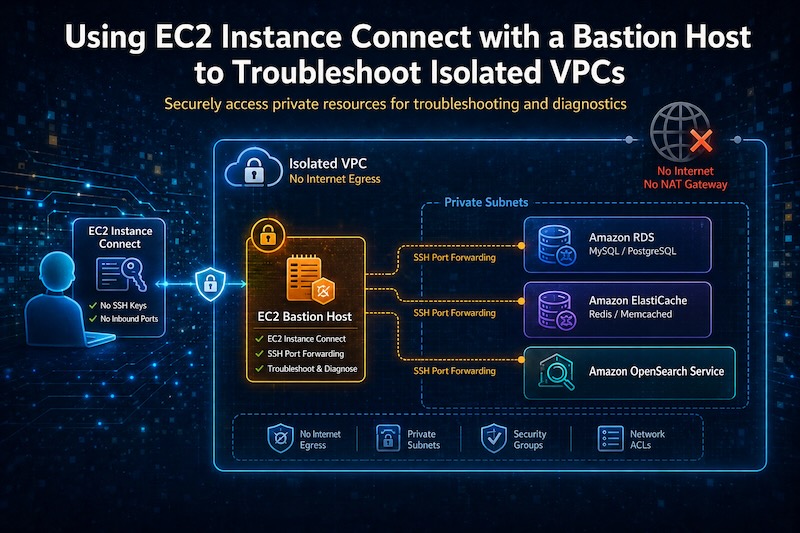
You built a properly isolated VPC. No NAT Gateway, no internet egress, resources locked behind private subnets. Your security posture is strong.
Then something breaks in production, and you need to connect to a private RDS instance to run a query.
Now what?
The Problem with Isolated VPCs
Isolated VPCs are excellent for security - but they create an operational challenge. When you remove all internet paths, you also remove the easy ways to get in for troubleshooting.
Traditional approaches all have drawbacks:
- SSH over public IP - defeats the purpose of isolation
- VPN/Client VPN - expensive, complex to manage, overkill for occasional access
- Session Manager alone - gets you a shell on an instance but doesn't help you reach other private resources like databases
- Temporarily adding a NAT Gateway - risky, slow, easy to forget to remove
The goal is reaching private endpoints - databases, caches, search clusters - without modifying your network architecture.
EC2 Instance Connect Endpoint
EC2 Instance Connect (EIC) Endpoint is an AWS-managed resource that lets you establish SSH connections to instances in private subnets without requiring a public IP, internet gateway, or any inbound security group rules from the internet.
The EIC Endpoint lives in your VPC and creates a private tunnel from the AWS control plane to your instance. Your instance never needs to be reachable from the internet - not even outbound.
Unlike a classic bastion sitting in a public subnet with port 22 open to the world, the connection here is initiated from the AWS side through their managed infrastructure. There's nothing listening on a public address.
The Architecture: EIC + Bastion + Port Forwarding
Here's the pattern that works well for reaching private resources:
Your Laptop
    → AWS CLI (open-tunnel)
        → EIC Endpoint (in your VPC)
            → Bastion Host (private subnet, no public IP)
                → SSH Port Forward
                    → RDS / Redis / OpenSearch (private subnet)
The bastion host is a small EC2 instance in a private subnet. It has no public IP and no inbound rules from the internet. Its only job is to act as a hop point - accepting forwarded connections from your laptop and routing them to private resources within the VPC.
Setting Up the EIC Endpoint
First, create the EC2 Instance Connect Endpoint in your VPC:
aws ec2 create-instance-connect-endpoint \
  --subnet-id subnet-0abc123def456 \
  --security-group-ids sg-0abc123def456
The security group on the EIC Endpoint needs outbound access to your bastion host on port 22. The bastion's security group needs to allow inbound on port 22 from the EIC Endpoint's security group.
That's it. No internet gateway, no public subnet, no elastic IP.
The Bastion Host
The bastion is minimal. A t4g.nano running Amazon Linux 2023 is more than sufficient. Key requirements:
- Private subnet only - no public IP, no route to internet
- Security group allowing inbound SSH from the EIC Endpoint security group
- Security group allowing outbound to your private resources (RDS on 3306/5432, Redis on 6379, OpenSearch on 443/9200)
- IAM instance profile - not for AWS API access, but so EC2 Instance Connect can push temporary SSH keys
The instance doesn't need a key pair at launch. EIC pushes ephemeral public keys that expire after 60 seconds - you never manage long-lived SSH keys.
Connecting: The Open-Tunnel Command
The aws ec2-instance-connect open-tunnel command establishes a WebSocket tunnel from your local machine through the EIC Endpoint to your bastion host:
aws ec2-instance-connect open-tunnel \
  --instance-id i-0abc123def456 \
  --remote-port 22 \
  --local-port 2222
This opens a local port (2222) that tunnels directly to port 22 on your bastion. You can then SSH through it:
ssh -o "ProxyCommand=aws ec2-instance-connect open-tunnel --instance-id i-0abc123def456 --remote-port 22" ec2-user@i-0abc123def456
But the real power is combining this with SSH port forwarding.
Port Forwarding to Private Resources
The pattern is the same regardless of what you're connecting to. Here's a full example with RDS:
ssh -o "ProxyCommand=aws ec2-instance-connect open-tunnel --instance-id i-0abc123def456 --remote-port 22" \
  -L 5432:my-database.cluster-abc123.us-east-1.rds.amazonaws.com:5432 \
  ec2-user@i-0abc123def456
Now localhost:5432 on your laptop routes through the tunnel to your private RDS cluster. Connect with your normal database client:
psql -h localhost -p 5432 -U admin -d mydb
The -L flag syntax is local_port:remote_host:remote_port, where remote_host is resolved by the bastion - not your laptop. This means any DNS name reachable from the bastion works. The local port is your choice - pick any free port on your machine. The remote port is fixed by the service.
The same pattern applies to any TCP service in your VPC:
| Service | Local Port | Remote Endpoint | Remote Port |
|---|---|---|---|
| PostgreSQL | 5432 | *.cluster-abc.rds.amazonaws.com |
5432 |
| MySQL | 3306 | *.cluster-abc.rds.amazonaws.com |
3306 |
| Redis | 6379 | *.cache.amazonaws.com |
6379 |
| OpenSearch API | 9200 | vpc-*.es.amazonaws.com |
443 |
| OpenSearch Dashboards | 8443 | vpc-*.es.amazonaws.com |
443 |
You can stack multiple forwards in one command with additional -L flags, and add -N to skip opening a shell if you only need the tunnels.
S3 and DynamoDB with VPC-Restricted Resource Policies
This one is different from port forwarding - it's about running commands from the bastion itself.
If you've locked down S3 buckets or DynamoDB tables with resource policies that restrict access to your VPC, you've created a different kind of access problem. These policies typically use a condition like:
{
  "Condition": {
    "StringEquals": {
      "aws:sourceVpc": "vpc-0abc123def456"
    }
  }
}
With this in place, even a user with full IAM permissions on the resource will get AccessDenied from their laptop - because the request doesn't originate from within the VPC.
The bastion host solves this. Since it sits inside the VPC and routes through Gateway VPC Endpoints for S3 and DynamoDB (which are free, by the way), requests from the bastion satisfy the sourceVpce/sourceVpc conditions.
SSH in and run your commands directly:
# Connect to the bastion
ssh bastion-prod

# Now you're inside the VPC - these requests go through the Gateway Endpoint
aws s3 ls s3://my-restricted-bucket/
aws s3 cp s3://my-restricted-bucket/config/secrets.json .

aws dynamodb scan --table-name my-locked-table --limit 10
aws dynamodb get-item --table-name my-locked-table \
  --key '{"pk": {"S": "USER#123"}, "sk": {"S": "PROFILE"}}'
Common scenarios: investigating data issues in locked-down buckets, running one-off DynamoDB queries during an incident, verifying that resource policies are actually blocking public origins (if it works from the bastion but not your laptop, the policy is doing its job), or pulling exports from resources that shouldn't be publicly reachable.
The bastion needs an IAM instance profile with the appropriate permissions on the target resources, scoped to read-only for troubleshooting.
This is the one scenario where the bastion isn't just a hop point - it's the actual origin of the request. The VPC network path is what grants access, not just IAM.
IAM Permissions
The user or role making the connection needs these permissions:
{
  "Version": "2012-10-17",
  "Statement": [
    {
      "Effect": "Allow",
      "Action": [
        "ec2-instance-connect:OpenTunnel"
      ],
      "Resource": "arn:aws:ec2:us-east-1:123456789012:instance-connect-endpoint/eice-0abc123def456"
    },
    {
      "Effect": "Allow",
      "Action": [
        "ec2-instance-connect:SendSSHPublicKey"
      ],
      "Resource": "arn:aws:ec2:us-east-1:123456789012:instance/i-0abc123def456",
      "Condition": {
        "StringEquals": {
          "ec2:osuser": "ec2-user"
        }
      }
    }
  ]
}
This is where the access control lives. No security group rules from 0.0.0.0/0, no network ACL exceptions. Access is governed by IAM - which means it's auditable, revocable, and can be scoped per-user or per-role.
You can also restrict which instances a user can tunnel to, limiting blast radius even further.
Security Properties
This approach preserves the isolation model while giving you operational access:
- No public IPs anywhere in the architecture
- No inbound internet rules in any security group
- No NAT Gateway required
- Ephemeral credentials - SSH keys expire in 60 seconds, no long-lived key pairs
- IAM-governed access - full CloudTrail audit trail of who connected and when
- Principle of least privilege - scoped per-user, per-instance, per-OS-user
If you've ever managed a Client VPN or a public-facing bastion with key rotation and static firewall rules, this is a significant reduction in operational overhead.
Common Gotchas
Security group chains: Make sure the bastion's security group allows outbound to your target resources. A common mistake is allowing SSH in from EIC but forgetting outbound rules to the database port.
Token expiration: The open-tunnel command uses your AWS credentials. If you're using short-lived credentials (as you should), make sure your session hasn't expired before wondering why the tunnel dropped.
Wrapping Up
Isolated VPCs shouldn't mean inaccessible VPCs. EC2 Instance Connect Endpoint gives you a clean, IAM-governed path into private subnets without compromising your network architecture.
Combined with a lightweight bastion host and SSH port forwarding, you get on-demand access to databases, caches, and search clusters - all without opening a single port to the internet.
The entire access pattern is auditable through CloudTrail, governed by IAM policies, and uses ephemeral credentials. Most VPN-based access patterns can't say the same.