The Problem Steering Solves
Every time you start a new chat session in most AI coding tools, the AI knows nothing about your project. It has no idea you use Tailwind instead of Bootstrap, that your API responses follow a specific envelope format, or which internal libraries to use instead of raw SDK calls.
You end up repeating yourself. "We use DynamoDB, not Postgres." "Our Lambda functions follow this pattern." "Don't use that library, use this one." Every session, every time.
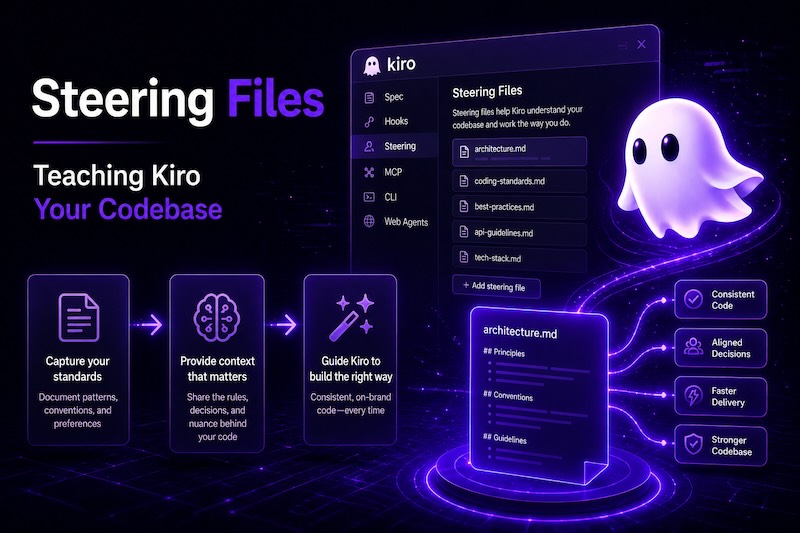
Steering files fix this. They're markdown documents that live in your project and get loaded into Kiro's context automatically. Write your conventions once, and every AI interaction respects them from that point forward.
Where They Live
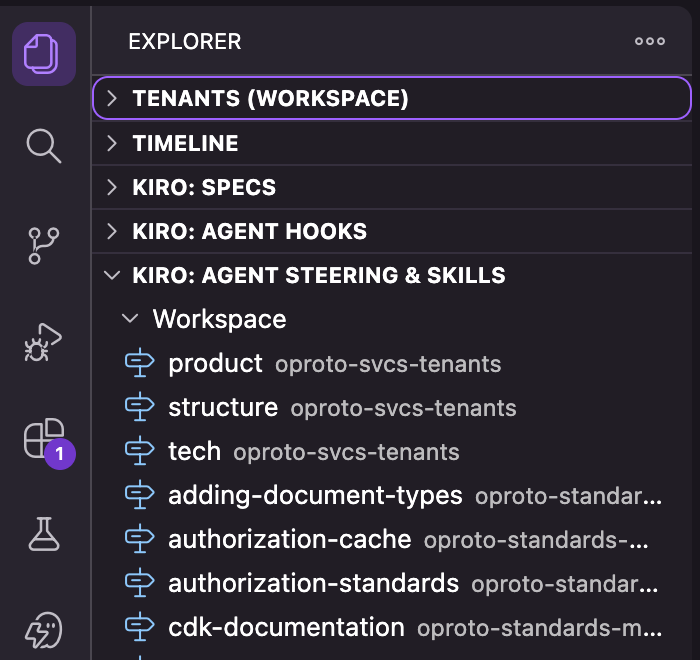
Steering files go in .kiro/steering/ inside your project:
your-project/
├── .kiro/
│   └── steering/
│       ├── conventions.md
│       ├── architecture.md
│       └── api-patterns.md
├── src/
└── ...
You can also put them at ~/.kiro/steering/ (macOS/Linux) or %USERPROFILE%\.kiro\steering\ (Windows) for user-level steering that applies across all your projects. Useful for personal preferences like "always use TypeScript strict mode" or "prefer async/await over .then() chains."
Every .md file in those directories is a steering file. No special registration needed. Drop a file in, Kiro picks it up.
The Three Inclusion Modes
Not every steering file should load into every conversation. Kiro has three modes that control when a file's content gets included in context:
Always (default)
If you don't add any front-matter, the file loads into every conversation. Good for things that always apply: your tech stack, behavioral rules, project structure.
# Project Conventions

- Framework: .NET 8 on AWS Lambda
- Database: DynamoDB (single-table design)
- Infrastructure: CDK (TypeScript)
- Testing: xUnit with FluentAssertions
Keep always-loaded files short and high-signal. Everything in them costs context budget on every interaction.
Conditional (fileMatch)
Loads only when Kiro reads a file matching a pattern. Add front-matter to enable it:
---
inclusion: fileMatch
fileMatchPattern: "*.csproj"
---

# .NET Project Configuration

When modifying .csproj files:
- Target framework must be net8.0
- Use central package management
- Do not add package references directly, use Directory.Packages.props
This file only loads when Kiro is working with .csproj files. The rest of the time it doesn't consume context. Other useful patterns:
"*.tf"for Terraform conventions"*Controller*.cs"for API controller patterns"*.test.*"for testing standards"Dockerfile*"for container build rules
Manual
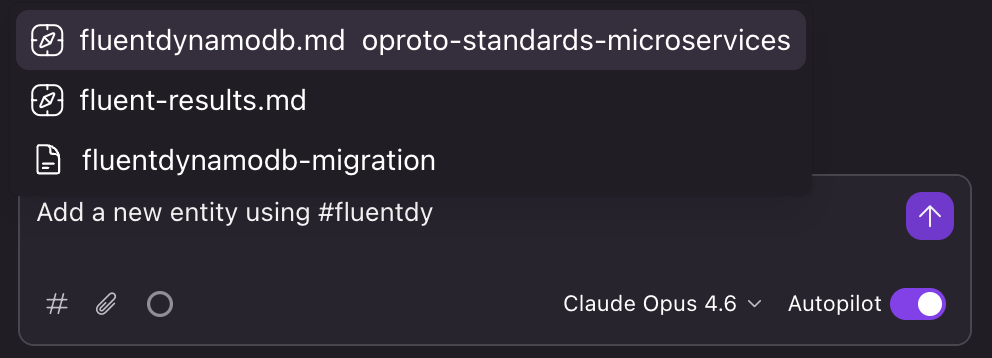
Only loads when you explicitly reference it with # in chat, or when Kiro decides it's relevant based on other context:
---
inclusion: manual
---

# DynamoDB Entity Conventions

## Key Structure
- Partition key format: `{EntityType}#{Id}`
- Sort key format: `{RelationType}#{Timestamp}`
...
Manual files are for detailed reference material that's only relevant to specific tasks. You might have 30 of these covering different aspects of your system, but only 2-3 are relevant to any given piece of work.
To pull one in, type # followed by a search term in the chat input and Kiro autocompletes with matching steering files and project files:
What to Put in Steering Files
The most common mistake is being too vague. "Follow clean code principles" doesn't change AI behavior. Specific, testable rules do.
Good steering content:
- Technology choices: what libraries you use and which ones to avoid
- Code patterns: how you structure services, handlers, repositories
- Naming conventions: specific formats for files, functions, variables, database keys
- Behavioral rules: things the AI should never do (more on this below)
- Architecture decisions: why things are the way they are, so the AI doesn't "improve" them
Bad steering content:
- Vague principles ("write clean code")
- Entire documentation dumps (use file references instead)
- Things that change frequently (put those in code comments)
Behavioral Rules
Behavioral rules are where steering pays for itself. These are rules about what the AI should NOT do, based on mistakes you've seen it make.
Examples from my projects:
## Non-Negotiable Rules

- DO NOT mark existing code as [Obsolete] and create new versions. Fix code in place.
- DO NOT increment package versions. Versioning is controlled by CI/CD.
- DO NOT replace custom library usage with raw SDK calls. If a library isn't working, stop and ask.
- DO NOT add try/catch blocks around code that already has error handling middleware.
Every one of these exists because I watched Kiro make the mistake multiple times. Once you add the rule, the mistake stops. Nothing else in steering gives you that kind of immediate payoff.
Referencing External Files
Steering files can pull in other files from your project using the reference syntax:
Our API follows this OpenAPI spec:
#[[file:docs/openapi.yaml]]
This injects the referenced file's content into the steering context. Useful for:
- OpenAPI/Swagger specs that define your API contract
- GraphQL schemas
- Database migration files that define your current schema
- Architecture decision records (ADRs)
The referenced file's content loads alongside the steering file, so the same inclusion rules apply. If the steering file is manual-inclusion, the referenced content only loads when that file is activated.
Sharing Across Projects
If you have multiple repositories that follow the same standards, you have a few options:
- User-level steering (
~/.kiro/steering/) for personal conventions that apply everywhere - Copy steering files into each project (simple but drifts over time)
- Shared repository as a second workspace folder - add a standards repo alongside your project in Kiro's workspace, and its
.kiro/steering/files apply to your session
I use option 3 for my microservice platform. A single Git repo holds all the shared standards, and I add it as a secondary workspace folder in Kiro. Update a standard in one place, it applies everywhere. I wrote about this approach in detail in Building at Scale with Kiro.
Starting Small
You don't need 30 steering files on day one. Start with one:
- Create
.kiro/steering/conventions.mdin your project - Write down your tech stack, 3-5 rules the AI keeps getting wrong, and any libraries to prefer or avoid
- Use Kiro for a few days and notice what you keep correcting
- Add those corrections as rules
It'll grow on its own. After a week you'll probably split it into 2-3 files. After a month you'll have a system that cuts way down on the number of times you have to correct the AI.
The goal isn't perfection on day one. It's building up a set of rules that eliminate the repetitive corrections over time.
What's Next
The next post in this series covers Specs: how to define features as structured requirements and let Kiro execute them as a task list, hands-off.